
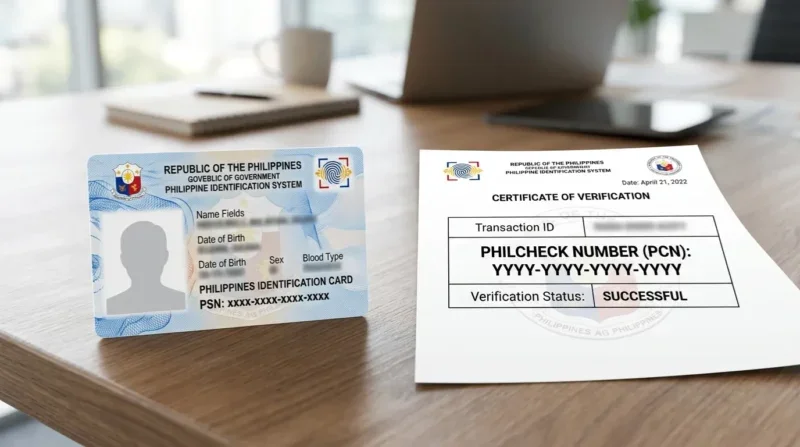
Account verification—commonly known as Know Your Customer (KYC)—is a fundamental compliance and security protocol mandated across licensed online gaming platforms in the Philippines. While basic registration allows players to explore gaming lobbies, test demonstration modes, and make preliminary deposits, completing identity verification is required before full account privileges, unrestricted payout processing, and enhanced account security are activated.
Identity verification serves two crucial functions: it protects player account balances from unauthorized access and guarantees that the operator complies with domestic anti-money laundering legislation and responsible gaming mandates. When real Philippine Peso transactions move between gaming profiles and digital wallets like GCash and Maya, establishing an unalterable match between the player's legal identity and payment account details prevents fraud, identity theft, and financial disputes.
This comprehensive guide outlines the regulatory rationale behind identity verification on the Filbet Casino platform, details every category of acceptable Philippine government identification, provides practical instructions for preparing compliant document uploads, examines common rejection triggers, and reviews data privacy safeguards.
Regulatory Framework and Purpose of Identity Verification
Account verification in the Philippine digital gaming space is governed by strict regulatory frameworks established by PAGCOR and statutory legislation under Republic Act No. 9160, known as the Anti-Money Laundering Act (AMLA), as amended. Licensed operators must implement comprehensive customer due diligence (CDD) programs to monitor financial activity and confirm customer identities.
| REGULATORY KYC ARCHITECTURE |
|---|
| [PAGCOR Compliance] ---> Underage Gaming Prevention (Strict 21+) |
| [AML Mandates] ---> Anti-Money Laundering & Fraud Mitigation |
| [Data Privacy Act] ---> Encrypted Storage & Identity Protection |
| [Player Security] ---> Sole Account Holder Payout Validation |
Operators enforce identity verification to maintain standards across four primary operational areas:
- Enforcing the Legal Age Limit: Under Philippine regulatory standards, participation in casino gaming is strictly limited to individuals aged 21 and older. Government document verification confirms the player's legal age before winnings can be disbursed.
- Mitigating Financial Fraud and Money Laundering: Verifying player identities ensures the platform is not exploited for illicit financial transactions, unauthorized third-party transfers, or chargeback fraud.
- Enforcing the Strict One-to-One E-Wallet Rule: Payouts are approved only when the legal name registered on the gaming profile perfectly matches the verified account name on the destination GCash or Maya profile.
- Preventing Multi-Accounting and Bonus Abuse: Operators restrict promotional incentives to one account per individual, household, device, and payment instrument. KYC documentation stops syndicate rings and automated bots from creating duplicate accounts to exploit welcome offers.
Verification Tiers on the Gaming Platform
The verification process follows a tiered structure designed to balance smooth onboarding with strict financial compliance.
[Level 1: Basic Registration]
- Mobile phone number binding via SMS OTP
- Creation of username and secure password
- Access to gaming lobbies and standard deposits
v
[Level 2: Standard KYC Verification]
- Official Philippine Government Photo ID submission
- Real-time facial selfie / liveness verification
- Verified digital wallet binding (GCash / Maya)
- Unlocks standard daily withdrawals and promotional bonuses
v
[Level 3: Enhanced Due Diligence (EDD)]
- Proof of residential address (utility bill / bank statement)
- Source of wealth / income documentation
- Unlocks high-volume VIP transaction limits and rapid approvals
Level 1: Basic Registration
Players achieve Level 1 status upon successful completion of the initial sign-up workflow and mobile number confirmation using a one-time verification token. At this stage, players can deposit funds, participate in casino games, and access community features. However, cash withdrawals remain locked until identity verification is completed.
Level 2: Standard KYC Verification
Level 2 is the standard compliance status required for regular gaming activities. It requires uploading a recognized Philippine government-issued photo ID, completing a facial liveness check, and confirming payment details. Once approved, players can withdraw winnings according to regular daily payout ceilings and claim promotional rewards.
Level 3: Enhanced Due Diligence
Level 3 applies to high-volume players, VIP members, or accounts that exceed standard cumulative transaction thresholds. Enhanced due diligence requires submitting secondary documentation, such as a recent utility bill, bank account statement, or formal proof of income, to ensure compliance with advanced AML monitoring requirements.
Officially Accepted Philippine Government Identification Documents
Submitting valid, government-issued identification is the foundation of a successful KYC submission. The compliance department accepts primary identification cards that feature a clear facial photograph, complete legal name, date of birth, document number, and official government seal.
| Identification Document | Issuing Agency | Primary / Secondary | Verification Strengths & Details |
|---|---|---|---|
| PhilSys National ID (PhilID / ePhilID) | Philippine Statistics Authority (PSA) | Primary | Highest acceptance rate. Both physical PVC cards and printed digital ePhilIDs with valid QR codes are accepted. |
| Philippine Passport | Department of Foreign Affairs (DFA) | Primary | Globally recognized security standard. Requires clear capture of the full biodata page including signature. |
| Driver's License | Land Transportation Office (LTO) | Primary | Accepted nationwide. Must display clear license number, expiration date, and official holographic laminate. |
| Unified Multi-Purpose ID (UMID) | SSS / GSIS / PhilHealth / Pag-IBIG | Primary | Highly reliable biometric card. Accepted provided card details and photo are sharp and undamaged. |
| Professional Regulation Commission (PRC) ID | Professional Regulation Commission | Primary | Accepted for licensed professionals. Must reflect an active, non-expired registration status. |
| Postal ID (Biometric) | Philippine Postal Corporation (PhilPost) | Primary | Modern biometric Postal IDs are accepted; older paper laminated cards are subject to secondary review. |
| Voter's Certification | Commission on Elections (COMELEC) | Secondary | Accepted with dry seal when paired with a secondary photo credential or proof of residence. |
| NBI Clearance / Police Clearance | National Bureau of Investigation / PNP | Secondary | Accepted as supplementary proof of identity; must be valid and within its one-year issuance window. |
Unacceptable Documents
The following documents are not accepted for standard KYC verification:
- Company employee badges or student IDs
- Expired government identification cards
- Hand-laminated non-biometric documents without verifiable security features
- Photocopied, black-and-white, or digitally altered documentation scans
- Barangay resident certificates lacking biometric or dry-seal validation
Step-by-Step Account Verification Walkthrough
Completing your account verification is a straightforward process when documentation is prepared according to platform guidelines.
[Navigate to Member Center]v
[Select "Account Verification" / "KYC"]
v
[Fill In Legal Name, Birthdate & ID Number]
v
[Upload Crisp Front & Back Images of Government ID]
v
[Capture Selfie Holding ID with Handwritten Date Note]
v
[Attach Verified E-Wallet Profile Screenshot]
v
[Submit for Automated & Compliance Officer Review]
Accessing the Verification Dashboard
1. Log in to your player account from your mobile browser, desktop interface, or installed application.
2. Navigate to the Member Center or User Profile section in the main navigation menu.
3. Select Account Security or Identity Verification (KYC).
4. Review your current verification status and click Start Verification.
Inputting Legal Personal Details
1. Enter your full legal name exactly as shown on your government ID:
- First Name
- Middle Name (do not omit if displayed on your credential)
- Surname / Last Name
- Suffix (such as Jr., Sr., III, if applicable)
2. Enter your date of birth matching the day, month, and year recorded on your official identification.
3. Select your ID type from the drop-down menu and carefully enter the document identification number.
Capturing and Uploading Document Images
1. Place your physical ID card on a flat, neutral-colored, well-illuminated surface (such as a clean wooden table).
2. Position your smartphone camera directly above the document, ensuring all four corners and outer borders are visible within the viewfinder.
3. Turn off your camera's flash to eliminate surface glare or reflections on laminated surfaces.
4. Capture a crisp, high-resolution photo of the front side. If the document has personal information or a barcode on the back (such as a Driver's License or PhilID), capture and upload the reverse side as well.
5. Confirm that all printed text, numerical sequences, and your facial photograph are sharp and legible before uploading.
Completing the Selfie Liveness Check
To ensure that an identification card is not being submitted fraudulently by a third party, the system requires a selfie confirmation:
1. Hold your physical ID card at chest level alongside a clean sheet of paper.
2. On the paper, write the words: "Filbet Verification", the Current Date (DD/MM/YYYY), and your Signature.
3. Position yourself in a brightly lit room facing a light source. Ensure your arm or fingers do not obscure your face, the text on the paper, or any details on the ID card.
4. Take a clear photograph or follow the on-screen facial biometric prompts (which may ask you to blink or turn your head slightly to confirm liveness).
Submitting Payment Proof
Upload a screenshot of your profile screen from GCash or Maya. The screenshot must clearly display:
- Your verified user status ("Fully Verified" badge in GCash or "Upgraded" status in Maya).
- Your registered mobile telephone number.
- Your full legal name, confirming it matches the name submitted on your government ID.
Common Reasons for Verification Rejection and How to Avoid Them
The compliance team processes hundreds of verification files daily. Most rejections are caused by simple, preventable clerical or photographic issues rather than eligibility concerns.
| COMMON KYC REJECTION CAUSES |
|---|
| [Blurry Uploads] ---> High compression, poor lighting, or camera |
| shake makes text or barcodes illegible. |
| [Name Mismatch] ---> Nicknames or shortened names used instead |
| of the exact legal name on the ID. |
| [Third-Party Wallet] ---> Funding account belongs to a relative or |
| friend, violating the 1-to-1 account rule. |
| [Cropped Edges] ---> Borders of the ID cut off by the camera |
| frame, preventing tamper inspection. |
Discrepancies in Legal Names
- The Issue: Entering a casual nickname (such as "Jun" instead of "Junior" or "Boboy" instead of "Roberto") during sign-up causes an automatic compliance flag.
- The Solution: Always register using your complete legal name as recorded on your birth certificate and official government cards. If your registered account name requires correction, contact customer support before submitting your KYC documents.
Cropped Borders and Obscured Details
- The Issue: Photos where the outer edges of the card are cropped out are rejected because compliance inspectors cannot confirm that the card has not been physically cut, tampered with, or pasted onto another document.
- The Solution: Leave a clear border of table surface around all four corners of your ID card when capturing the image.
Flash Glare and Insufficient Lighting
- The Issue: Camera flash creates bright white reflections on plastic laminates, making crucial text lines, birth dates, or security holograms unreadable.
- The Solution: Capture photos during daylight hours near a window or under soft, indirect room lighting. Disable your camera's automated LED flash.
Third-Party Financial Accounts
- The Issue: Attempting to bind a GCash or Maya wallet registered under the name of a spouse, family member, or friend.
- The Solution: The platform strictly enforces a one-to-one name match. The verified name on your payment account must be identical to the verified name on your gaming profile. Shared or third-party funding channels are strictly barred under anti-money laundering regulations.
Verification Processing Timelines and Resolution Pathways
Under standard operational conditions, automated document inspection engines process uploads within 15 to 30 minutes. If your documents require manual review by a compliance specialist, review times typically range from 2 to 12 hours, with a maximum processing window of 24 hours during high-volume periods or major promotional campaigns.
| Verification Stage | Average Processing Time | Operational Actions Performed |
|---|---|---|
| Automated Inspection | 5 – 15 Minutes | Scans image resolution, OCR text extraction, barcode validity, and face-match algorithms. |
| Manual Officer Review | 2 – 12 Hours | Compliance personnel inspect document authenticity, cross-reference AML registries, and review payment match. |
| Enhanced Due Diligence | 12 – 24 Hours | Advanced review of proof of address, source of wealth, or high-value transaction documentation. |
How to Follow Up on Pending Submissions
If your verification status displays "Under Review" for longer than 24 hours:
1. Access the official live chat support portal via the platform homepage.
2. Select Account Verification / KYC Inquiry in the chat routing menu.
3. Provide your registered player username and registered mobile phone number.
4. Request an update on your document review status. The support specialist will inspect internal compliance notes and advise you if replacement images are required.
For related details on withdrawing funds once your KYC is approved, read our Filbet withdrawal limits and processing guide. If you experience authentication issues during the review phase, refer to our Filbet login troubleshooting guide.
Data Privacy Safeguards and Information Security
Submitting sensitive personal identification documents online requires confidence in the operator's data privacy protections. Platform operators must handle player records in accordance with the provisions of Republic Act No. 10173, known as the Data Privacy Act of 2012, enforced by the National Privacy Commission (NPC).
The platform maintains comprehensive digital protections:
- End-to-End Encryption: Uploaded images and personal records are encrypted in transit using Transport Layer Security (TLS 1.3) and stored at rest using Advanced Encryption Standard (AES-256) cryptographic storage protocols.
- Restricted Access Controls: Only certified compliance personnel with specific clearance levels can access player identity records. Regular customer service personnel cannot view your full unredacted identity files.
- Zero Third-Party Commercial Sharing: Personal information collected for verification purposes is used exclusively for compliance verification, fraud prevention, and regulatory reporting. Your data is never sold, leased, or distributed to third-party commercial marketing networks.
Responsible Gaming Standards and Player Self-Regulation
Identity verification is an essential tool for maintaining responsible gaming practices. By establishing verifiable player identities, the system can enforce player-requested deposit ceilings, session time restrictions, and self-exclusion exclusions across connected gaming environments.
The regulatory framework maintained by PAGCOR requires licensed platforms to provide self-exclusion programs for players seeking to restrict their gaming activity. If you or someone you know requires assistance with responsible gaming, confidential advice and support resources are available through international and domestic support organizations, including Gamblers Anonymous and Gambling Therapy.
Frequently Asked Questions
Can I deposit funds and place bets before completing KYC verification?
Yes. You can complete initial registration, make deposits, and enjoy casino games immediately upon verifying your mobile phone number. However, completing Level 2 KYC verification is mandatory before you can submit withdrawal requests to your digital wallet or bank account.
Why was my PhilSys National ID rejected if it is an official government document?
PhilSys National IDs are usually rejected due to poor image clarity, flash glare washing out text, or the photo being cropped. Additionally, if you submitted an ePhilID printed on paper, ensure the official QR code is sharp and undamaged, as compliance engines scan the QR code to verify authenticity against government registries.
Can I withdraw my winnings using my spouse's or relative's GCash account?
No. The platform strictly enforces anti-money laundering compliance rules requiring an exact match between the verified player name and the legal name on the recipient payment wallet. Withdrawals directed to third-party e-wallets or bank accounts will be rejected, and the account may be temporarily frozen pending compliance review.
How long do my uploaded KYC verification documents remain valid?
Once approved, standard Level 2 verification remains valid indefinitely unless your submitted government identification expires, you request a change to your registered legal name or mobile number, or suspicious activity triggers an enhanced due diligence review.
What should I do if my government ID has expired and I am waiting for renewal?
Expired identification documents cannot be accepted by compliance systems. If your primary ID is expired, submit an alternative valid primary document (such as a Philippine Passport, Driver's License, or UMID). If no alternative primary card is available, contact customer support to discuss acceptable secondary documentation options.
Are my identity documents shared with tax authorities or marketing agencies?
No. Player identification files are processed strictly for regulatory compliance under the Data Privacy Act of 2012 and AML regulations. Your personal information is protected with enterprise encryption protocols and is never monetized, traded, or shared with third-party advertising companies.
Connected Resources and Guides
- Filbet Comprehensive Casino Platform Review
- Filbet SMS OTP Verification Troubleshooting Guide
- Filbet Password Recovery and Reset Instructions
- Filbet Login Troubleshooting and Error Resolutions
- Filbet GCash Deposit and Payment Walkthrough
- Filbet Maya Payment and Cash-In Guide
- Filbet Withdrawal Limits and Processing Timelines
- Filbet Legit or Scam Platform Safety Review
- Filbet Android APK Installation Tutorial
- Filbet iOS PWA Mobile Setup Guide
- Responsible Gaming and Player Protection Policies
Official Member Access and Registration
To access real-money gaming tables, practice slot mechanics, or claim verified promotional credits, visit the official Filbet Portal on mobile or desktop.