
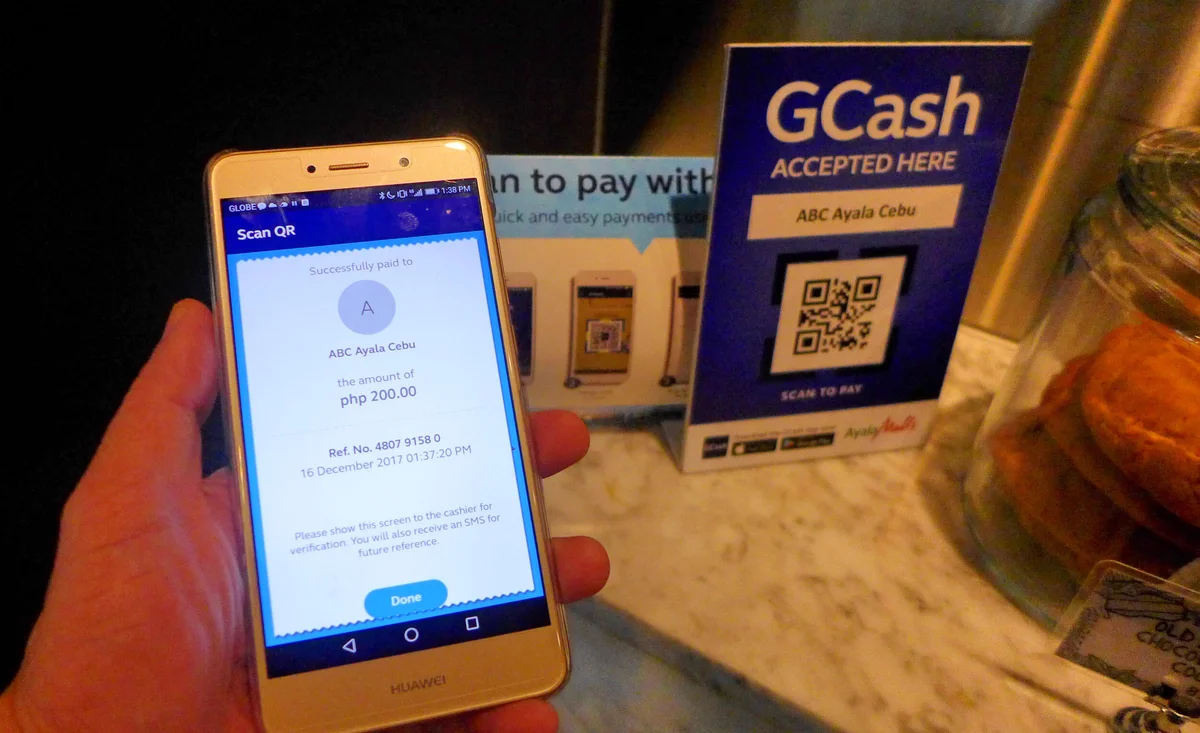
In the Philippine digital entertainment and online gaming ecosystem, GCash serves as the most widely used and convenient payment method. Backed by Bangko Sentral ng Pilipinas (BSP) licensing and accessible to tens of millions of Filipinos nationwide, this mobile wallet enables near-instant deposits, straightforward fund transfers, and smooth withdrawals.
When funding your player account on the Filbet Casino platform, utilizing GCash eliminates the friction of traditional bank wire transfers, steep credit card handling fees, and prolonged clearance delays. Transactions typically reflect in your gaming balance within seconds, allowing you to participate in your favorite slots, live table games, and arcade titles without delay.
However, executing smooth, hassle-free transactions requires a clear understanding of deposit channels, wallet tier limits, dynamic QR Ph processing rules, and troubleshooting protocols for floating balances. This comprehensive guide delivers a step-by-step walkthrough of every GCash deposit method, details transaction ceilings, explains how to claim eligible promotional bonuses during cash-in, and provides immediate remedies for delayed funds.
Why GCash Is the Preferred Gaming Wallet in the Philippines
The widespread adoption of mobile financial technology across the Philippines has transformed how players interact with digital entertainment platforms. GCash offers several distinct operational benefits:
| GCASH PAYMENT HIGHLIGHTS |
|---|
| [Instant Settlement] ---> Funds transfer in real time (0-60 seconds) |
| [Zero Platform Fees] ---> Direct 1:1 value crediting to game balance |
| [QR Ph Compatibility] ---> Universal standard prevents typing errors |
| [Biometric Security] ---> MPIN + Face ID / Fingerprint verification |
- Near-Instant Balance Updates: Unlike automated clearing house (ACH) bank transfers that can take hours or days to settle, GCash API integrations credit deposits almost instantly once the transaction is validated.
| Account / Transaction Tier | Transaction Minimum | Transaction Maximum | Monthly Inflow Ceiling |
|---|---|---|---|
| Basic GCash Account | PHP 100 | Not Recommended | PHP 10,000 (Severe restrictions) |
| Fully Verified GCash Account | PHP 100 | PHP 50,000 per transfer | PHP 100,000 to PHP 500,000 |
| Filbet Standard Deposit | PHP 100 | PHP 20,000 per transaction | Subject to player VIP tier |
| Filbet High Roller / VIP | PHP 1,000 | PHP 50,000+ per transaction | Customizable upon request |
[Navigate to Filbet Cashier]
v
[Select "GCash" Payment Method]
v
[Input Desired Amount (PHP 100 - 50,000)]
v
[Choose Deposit Channel: QR Ph vs WebPay]
v v
[Dynamic QR Ph] [Direct WebPay]
Scan code via Input GCash number,
GCash App enter OTP & MPIN
v
[Immediate Balance Credit & Receipt]
Accessing the Deposit Cashier
1. Log in to your player account using your mobile browser, desktop interface, or installed application.
2. Tap the Deposit button prominently displayed in the top header or user profile dashboard.
3. Select GCash from the list of available Philippine payment options.
Selecting Your Deposit Amount and Promotional Bonuses
1. Choose from pre-configured amount tiles (e.g., PHP 200, PHP 500, PHP 1,000, PHP 5,000) or manually type your custom amount into the designated numeric field.
2. If you wish to activate an active promotional offer—such as a first deposit match, daily reload bonus, or slot cash rebate—ensure you check the corresponding bonus selection box.
3. Review the wagering turnover requirements associated with your selected promotion before proceeding.
4. Click Proceed to Pay or Submit Deposit.
Method 1: Depositing via Dynamic QR Ph (Recommended)
Dynamic QR Ph is the fastest and most reliable payment method. Each QR code is uniquely generated for your specific transaction, embedding both the exact amount and a distinct merchant routing tag.
> 🔄 Execution Workflow: [System Displays Dynamic QR] ---> [Capture Screenshot of QR Code]
v
> 🔄 Execution Workflow: [Open GCash App] ---> [Tap "QR" & Select "Upload QR"]
v
> 🔄 Execution Workflow: [Confirm Merchant & Total] ---> [Tap "Pay PHP XXX" & Save Receipt]
1. Upon submitting your deposit request, the screen will generate a unique QR code alongside a countdown expiration timer (typically 5 to 10 minutes).
2. Take a screenshot of the QR code using your mobile phone (Press Power + Volume Down on Android, or Side Button + Volume Up on iPhone).
3. Open your official GCash mobile application and authenticate with your MPIN or biometrics.
4. Tap the QR or Pay QR icon located in the main navigation bar.
5. In the QR scanner interface, tap Upload QR (or select the image icon to choose a picture from your photo gallery).
6. Select the screenshot of the dynamic QR code you just captured.
7. The GCash app will automatically decode the image and display the merchant payment screen.
8. Verify that the payment amount matches your requested deposit exactly. Do not modify the amount, as altering the numerical value prevents automated system matching.
9. Tap Pay PHP [Amount].
10. Once the transaction completes, save the transaction receipt or note down the 13-digit Reference Number.
11. Return to the gaming portal; your wallet balance will automatically update within 30 to 60 seconds.
Method 2: Depositing via Direct WebPay Gateway
The direct WebPay gateway connects your browser session directly with the secure merchant processing server.
1. After choosing your deposit amount, select the GCash WebPay channel and tap submit.
2. You will be redirected to the secure payment gateway interface.
3. Enter your 11-digit registered GCash mobile phone number (starting with `094. GCash will dispatch a 6-digit numeric authentication code via SMS to your handset. Input this code into the verification field. If you encounter SMS delivery delays, consult our Filbet SMS OTP verification guide.
| Deposit Error | Probable Cause | Actionable Solution |
|---|---|---|
| Funds Deducted, Balance Not Credited | System synchronization lag or network timeout between gateway and platform. | Allow 15 minutes for automated polling. If unresolved, submit receipt and Reference Number to live chat. |
| "Merchant Limit Exceeded" | The intermediate merchant collection account has reached its daily inflow cap. | Cancel the request, return to cashier, and select an alternative GCash gateway channel or QR Ph option. |
| "QR Code Expired" | The dynamic QR code remained un-scanned past its 5-to-10 minute validity window. | Discard the expired screenshot, generate a fresh QR code in the cashier, and complete payment immediately. |
| "System Busy / Connection Timeout" | Scheduled GCash maintenance or high telco packet latency. | Check GCash official service advisories, toggle your network connection, or switch temporarily to Maya. |
| Deposit Rejected by Compliance | Payment initiated from an e-wallet registered to someone else. | The platform enforces strict 1:1 name matching. Funds will be returned or held pending identity review. |
[Funds Deducted from GCash]
v
[Wait 10-15 Minutes for Auto-Sync Engine]
[Reflected] [Still Missing]
v v
[Enjoy Gaming] [Open GCash App > Inbox / Activity]
v
[Capture Full Receipt with 13-Digit Ref No.]
v
[Contact Filbet Live Chat Support]
v
[Manual Balance Reconciliation (5-30 Mins)]
1. Wait 10 to 15 Minutes: The automated payment reconciliation daemon polls the gateway continuously to identify and credit unmatched transactions.
2. Retrieve Your GCash Receipt: Open your GCash application, tap Activity or open your transaction SMS, and locate the official receipt. Verify the 13-digit Reference Number (e.g., `Ref No. 1029384756102`).
3. Contact Customer Support: Open the 24/7 live chat window on the platform website.
4. Submit Transaction Proof: Send your player username, exact deposit amount, time of transaction, and an unedited screenshot of the GCash receipt showing the 13-digit reference number.
5. The support officer will cross-reference the payment gateway logs and manually credit the funds to your gaming balance.
Strict One-to-One Account Name Rule
A cornerstone of regulatory compliance under PAGCOR and international anti-money laundering standards is the strict prohibition of third-party financial transfers:
- The legal name registered on your gaming account must match the legal name on your verified GCash profile.
- You cannot deposit funds using a wallet owned by a spouse, family member, coworker, or acquaintance.
- Attempting to deposit from a third-party account can result in an automated fraud freeze, requiring extensive documentation and KYC review to unlock.
If your registered platform name contains typographical errors or missing middle names that cause a mismatch with your wallet, contact customer support immediately to reconcile your details. For additional context, consult our Filbet account verification and KYC guide.
Security Best Practices for Mobile Wallet Users
Protecting your mobile money against unauthorized intrusion requires adhering to strong security practices:
- Guard Your MPIN and OTP: Never disclose your 4-digit MPIN or 6-digit SMS verification code to anyone. Platform personnel will never request your MPIN under any circumstances.
- Beware of Deceptive SMS Notifications: Cybercriminals often send fake SMS alerts claiming: "You have received PHP 1,000 from Filbet. Click here to claim." Always open your official GCash application directly to verify your balance rather than clicking external text links.
- Avoid Public Wi-Fi When Depositing: Unencrypted public Wi-Fi networks in shopping malls and transit hubs can expose transaction traffic. Always execute financial transactions over secure home broadband or cellular mobile data.
- Maintain Clear Transaction Logs: Keep receipts of major deposits and balance cash-outs until the funds have settled into your player wallet or personal accounts.
Responsible Gaming and Spending Controls
Online gaming should always remain an entertaining pastime conducted strictly within your discretionary entertainment budget. The ease and speed of mobile wallet deposits make it essential to track your spending habits carefully.
- Establish Personal Budgets: Decide on a weekly or monthly gaming budget before initiating deposits, and never gamble with funds allocated for rent, groceries, education, or essential living expenses.
- Avoid Chasing Losses: Depositing additional funds to recover losses frequently leads to compounded financial stress. When your predetermined session limit is reached, conclude your gaming session.
- Utilize Platform Spending Caps: Contact customer support to implement voluntary deposit limits or cooling-off periods on your profile.
The regulatory framework maintained by PAGCOR mandates comprehensive responsible gaming safeguards. If you or someone you care about requires guidance, confidential counseling, or self-exclusion assistance, free resources are available through Gamblers Anonymous and Gambling Therapy.
Frequently Asked Questions
What is the minimum and maximum amount I can deposit using GCash?
The standard minimum deposit via GCash is PHP 100 per transaction, making the platform accessible for casual players. The maximum single-transaction ceiling is typically PHP 20,000 to PHP 50,000, depending on your player account VIP standing and whether your GCash profile has completed full identity verification.
How long does it take for a GCash deposit to appear in my casino wallet?
Under normal conditions, deposits process automatically via direct API integration and reflect in your player wallet within 15 to 60 seconds. During peak telecommunication hours or when GCash conducts system updates, processing may take up to 15 minutes.
Does Filbet charge any fees for depositing through GCash?
No. The platform does not charge administrative fees or surcharges on GCash deposits. You receive 100% of your deposited money directly in your player balance. Any minor cash-in fees charged by third-party over-the-counter kiosks when loading your personal GCash wallet are separate carrier costs.
Can I deposit using an unverified GCash account?
While technically possible for very small amounts, it is strongly discouraged. Unverified GCash accounts face strict transaction limits, cannot handle larger sums, and are ineligible for withdrawals. Platform rules require withdrawals to be sent to a fully verified payment account in your name.
What should I do if my GCash balance was deducted but my deposit failed to reflect?
Do not panic. Wait 10 to 15 minutes for the automated reconciliation engine to sync. If your balance remains uncredited, take a screenshot of your GCash receipt showing the 13-digit Reference Number, open the 24/7 live chat support window, and provide the receipt to an agent for immediate manual crediting.
Can I withdraw my winnings back to the same GCash account?
Yes. In fact, standard anti-money laundering regulations require withdrawals to be returned to the identical funding source whenever possible. To learn about daily withdrawal caps and approval timelines, refer to our Filbet withdrawal limits and processing guide.
Connected Resources and Guides
- Filbet Comprehensive Casino Platform Review
- Filbet Maya Payment and Cash-In Guide
- Filbet Withdrawal Limits and Processing Timelines
- Filbet Account Verification and KYC Guidelines
- Filbet SMS OTP Verification Troubleshooting Guide
- Filbet Login Troubleshooting and Error Resolutions
- Filbet Password Recovery and Reset Instructions
- Filbet Android APK Installation Tutorial
- Filbet iOS PWA Mobile Setup Guide
- Responsible Gaming and Player Protection Policies
Official Member Access and Registration
To access real-money gaming tables, practice slot mechanics, or claim verified promotional credits, visit the official Filbet Portal on mobile or desktop.