
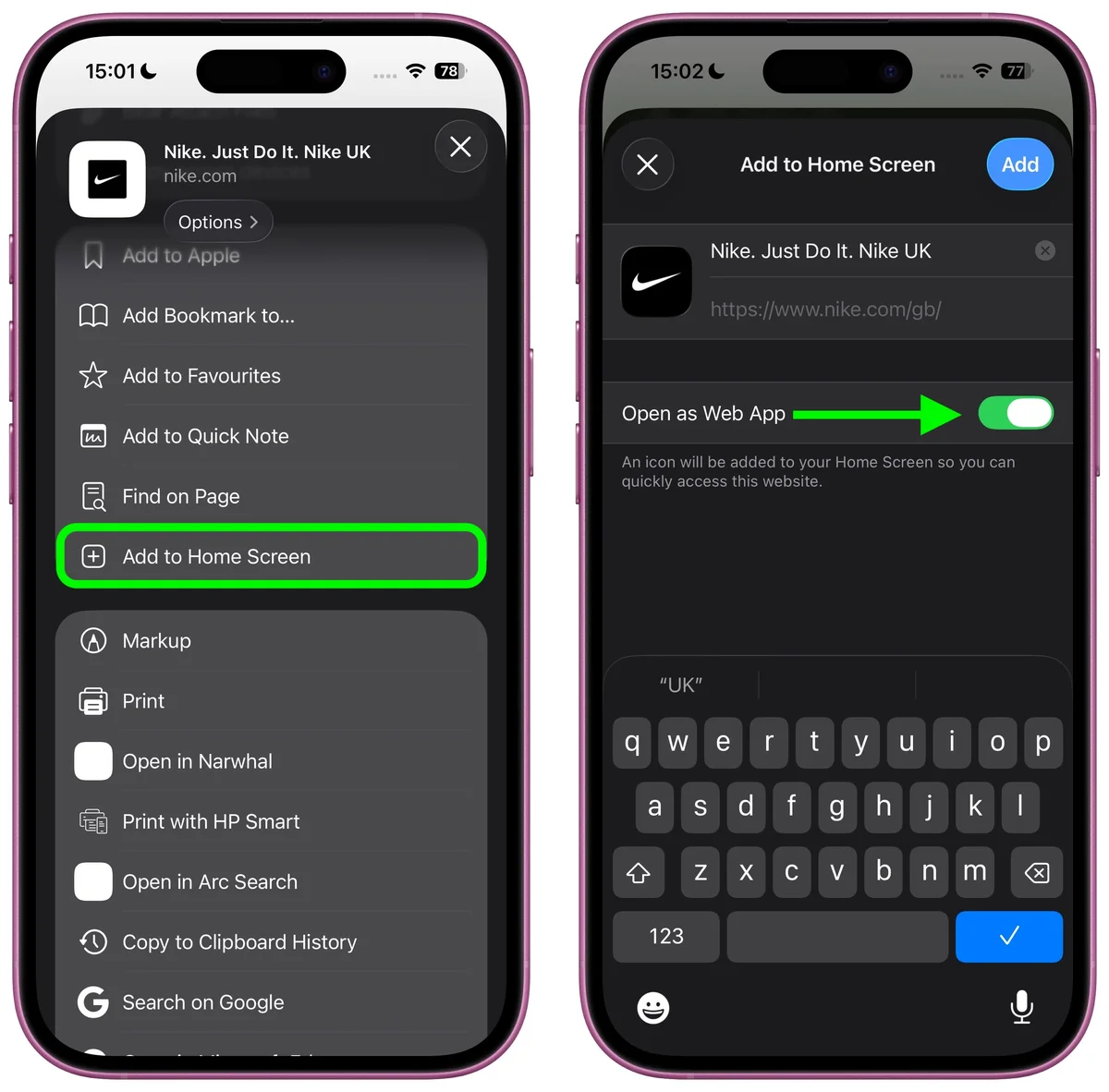
Apple’s iOS operating system is renowned for its smooth user experience, responsive touch interfaces, and robust security architecture. For iPhone and iPad users in the Philippines, accessing real-money online casino lobbies requires a slightly different approach than on Android devices. Because Apple enforces strict global restrictions on distributing real-money gambling software via the App Store, and prohibits unauthorized binary package sideloading, operators deploy modern Progressive Web App (PWA) architecture to deliver a seamless, native-grade gaming experience.
A Progressive Web App installed through Apple Safari bridges the gap between traditional browser navigation and native software. Once added to your iOS Home Screen, the web application runs in an isolated, full-screen standalone window—completely removing the Safari URL address bar and navigation controls. It provides instant loading, hardware-accelerated graphics rendering, secure biometric authentication via Face ID or Touch ID, and direct integration with mobile payment gateways like GCash and Maya.
This comprehensive guide delivers a detailed walkthrough for installing and configuring the iOS web application for the Filbet Casino platform. We explain the underlying technology, guide you through Safari setup, troubleshoot common iOS display issues, and share practical performance optimizations for iPhones and iPads.
Understanding iOS Web App Architecture and App Store Restrictions
Apple maintains stringent Developer Guidelines regarding real-money wagering applications. In most international territories, including the Philippines, downloading a native casino app (.ipa format) directly from the App Store is restricted unless the operator maintains specific localized corporate agreements and regional software certifications.
| IOS ARCHITECTURE COMPARISON |
|---|
| [Enterprise Cert Sideloading] ---> Unstable; certificates revoked |
| weekly by Apple; security risks. |
| [Standard Mobile Browser] ---> Functional, but cluttered with |
| URL bars, tabs, and slow loading. |
| [Progressive Web App (PWA)] ---> Native full-screen feel, persistent |
| login, zero certificate revokes. |
Historically, some third-party platforms distributed custom iOS apps using enterprise developer certificates. However, Apple routinely revokes enterprise certificates, causing apps to crash without warning and leaving players unable to access their balances.
| Device Parameter | Minimum Specification | Recommended Specification |
|---|---|---|
| Operating System | iOS 14.0 or iPadOS 14.0 | iOS 16.0, 17.0, 18.0 or newer |
| Supported Handsets | iPhone 8, iPhone X, iPhone XR | iPhone 12, 13, 14, 15 series, or iPhone SE (2nd/3rd Gen) |
| Supported Tablets | iPad (6th Gen+), iPad Air (3rd Gen+) | iPad Pro (M-series chip) or iPad Air (M1/M2) |
| Required Browser | Apple Safari (Built-in) | Apple Safari with WebGL enabled |
| Network Connectivity | 4G LTE or 10 Mbps Wi-Fi | 5G Mobile Data or Low-Latency Fiber Broadband |
[Open Safari Browser]
v
[Navigate to Official Filbet Domain]
v
[Tap the "Share" Button (Square with Upward Arrow)]
v
[Scroll Down Menu & Select "Add to Home Screen"]
v
[Confirm Name & Tap "Add" in Top-Right Corner]
v
[Launch from Home Screen in Standalone Mode]
Launching the Official Portal in Safari
1. Open the pre-installed Safari browser on your iPhone or iPad.
2. Type or paste the official platform URL for Filbet Casino into the Safari search bar.
3. Confirm that the address bar displays the padlock icon, confirming an active Transport Layer Security (TLS/SSL) encrypted connection.
4. Allow the homepage to load completely so that all manifest files and graphical assets are cached in memory.
Opening the Safari Share Menu
1. Locate the Share button located in the toolbar at the bottom of your iPhone screen (or at the top right of an iPad screen). The Share icon resembles a square with an arrow pointing upward.
2. Tap the Share button to open the iOS share sheet dialog.
Selecting "Add to Home Screen"
1. Scroll down through the vertical list of share options.
2. Locate and tap Add to Home Screen (labeled Magdagdag sa Home Screen if your iOS interface is set to Filipino).
3. A preview window will appear displaying the platform's official high-resolution application icon alongside an editable title box.
Naming and Creating the Shortcut
1. The default label usually populates as "Filbet Casino" or "Filbet Home." You can keep this name or shorten it according to your preference.
2. Tap the blue Add button located in the upper-right corner of the screen.
3. Safari will automatically close, returning you to your iOS Home Screen where the dedicated app launcher icon is now positioned.
Initial Launch in Standalone Window Mode
1. Tap the newly created app icon on your Home Screen.
2. Notice how the application launches independently: the top Safari URL bar, bottom tab switcher, and navigation arrows are absent.
3. The interface functions as an app wrapper, dedicating 100% of your screen estate to live casino tables, slot interfaces, and cashier controls.
Optimizing iOS Settings for Enhanced Gaming Performance
Adjusting a few native iOS settings will help ensure your mobile gaming sessions run at peak graphical fidelity and without performance hiccups.
| IOS PERFORMANCE TUNING |
|---|
| [Enable WebGL & JavaScript] ---> Smooth 60fps canvas animation. |
| [Configure Face ID Autofill]---> Instant, secure session login. |
| [Set Focus / Do Not Disturb]---> Blocks incoming call interruptions. |
| [Disable Low Power Mode] ---> Eliminates frame drops on live video. |
Ensuring WebGL and Hardware Acceleration Are Active
Modern interactive slots and live dealer streams utilize WebGL hardware rendering to produce fluid animations.
1. Open your iPhone Settings.
2. Scroll down and tap Safari.
3. Scroll to the very bottom and select Advanced.
4. Tap Feature Flags (or Experimental Features in earlier iOS releases).
5. Ensure that WebGL 2.0 and GPU Process: Canvas Rendering are enabled.
Configuring Face ID and Touch ID for Quick Authentication
You can pair your device biometrics with Apple Keychain to enable one-touch authentication:
1. When logging into your player profile on the PWA, enter your registered mobile number and password manually.
2. When iOS displays the pop-up prompt "Would you like to save this password in your iCloud Keychain?", tap Save Password.
3. On future logins, tap the password field; iOS will automatically authenticate via Face ID or Touch ID and fill your credentials instantly. If you experience forgotten credentials, refer to our Filbet password recovery guide.
Creating a Gaming Focus Profile
An incoming phone call or full-screen social media alert can disrupt an active live blackjack hand or roulette spin.
1. Open Settings > Focus.
2. Tap the + icon in the upper right to create a custom Focus mode named "Gaming."
3. Silence non-essential notifications from messaging applications and configure phone calls to allow only urgent contacts.
4. Set the Focus profile to activate automatically whenever you open the gaming app.
Troubleshooting Common iOS PWA Issues
While iOS delivers an exceptionally stable environment, technical quirks can occasionally arise. Here is how to resolve them quickly.
Missing "Add to Home Screen" Option
If you cannot locate the "Add to Home Screen" button in your share sheet:
- Check Your Active Browser: You are likely using Google Chrome, Firefox, or an in-app browser within an app like Facebook or Messenger. Apple restricts Home Screen installation permissions to Safari. Copy the link, launch Safari directly, and perform the steps there.
- Inspect iOS Content Restrictions: If your device is managed by enterprise profiles or parental Screen Time controls, navigate to Settings > Screen Time > Content & Privacy Restrictions and confirm that Safari sharing functions are permitted.
Persistent White Screen or Infinite Loading Spinner
If tapping the Home Screen icon results in a blank white canvas or stuck loading animation:
- Corrupted Safari Cache: Open Settings > Safari > Advanced > Website Data. Search for the platform domain, swipe left, and tap Delete. Reopen the app from your Home Screen to pull fresh server files.
- Private Browsing Conflicts: Ensure that your Safari primary tab is not locked in Private Browsing mode when establishing the Home Screen shortcut, as strict privacy modes can block the local storage required by service workers.
Game Audio Fails to Play
A frequent issue for iPhone users is games launching without sound despite turning up the media volume slider.
- Check the Physical Silent Switch: iPhones feature a physical Ring/Silent switch on the left rail (or an Action Button on iPhone 15 Pro models). If your phone is set to Silent/Mute, Safari WebKit automatically mutes in-game HTML5 audio. Flip the switch to Ring mode to restore sound.
- In-Game Sound Controls: Verify that the audio toggle inside the specific slot or live table setting menu is switched to the active state.
Seamless Payment Gateway Integration on iOS
One of the greatest benefits of running the PWA on iOS is seamless app-switching when depositing or withdrawing funds.
[PWA Cashier Window] ---> Tap "Deposit via GCash / Maya"v
[iOS System App Handoff / Deep Link]
v
[GCash or Maya App Launches Directly]
v
[Authorize via Face ID / MPIN]
v
[Automatic Return to Casino PWA Wallet]
When you initiate a funds transfer using GCash or Maya, the web app uses iOS universal deep linking to launch your native payment application automatically. You authorize the payment using Face ID and your MPIN, and upon confirmation, iOS smoothly returns you back to the casino lobby with your updated balance reflected in seconds.
For complete deposit workflows, consult our dedicated Filbet GCash deposit guide and Filbet Maya payment guide.
Mobile Security, Compliance, and Responsible Play
Operating a gaming profile on an iPhone offers robust baseline security, but personal security practices remain essential:
- Protect Your Apple ID: Ensure your Apple ID is protected with two-factor authentication (2FA). Never enter your Apple credentials on unverified third-party web portals.
- Avoid Unsupervised Device Sharing: If family members or minors have access to your iPhone or iPad, use Guided Access or Face ID locks on specific applications to prevent underage individuals from accessing your gaming profile.
- Never Share SMS Authentication Codes: Even with Face ID enabled, critical financial actions may require a one-time SMS verification code. If codes are delayed, follow the steps in our Filbet SMS OTP verification guide.
The regulatory framework enforced by PAGCOR mandates strict age verification (21+) and encourages players to use self-imposed spending caps. Gaming should always remain an enjoyable form of recreation within personal financial means.
If you or someone in your household experiences difficulty controlling time or expenditure on gaming activities, free, confidential advice and support resources are available through Gamblers Anonymous and Gambling Therapy.
Frequently Asked Questions
Why isn't the Filbet app available for direct download on the Apple App Store?
Apple enforces strict regional distribution guidelines regarding real-money casino platforms in various international jurisdictions, including the Philippines. To deliver an unrestricted, highly responsive gaming client without the risk of sudden store removals or third-party enterprise certificate revokes, the platform operates as an optimized Progressive Web App (PWA).
Does adding the Filbet PWA consume a large amount of storage on my iPhone?
No. The PWA installer relies on Safari's native caching mechanisms. Unlike native applications that can take up 150 MB to 300 MB of storage, the PWA shortcut consumes less than 5 MB of device memory, reserving storage for your photos, media, and other personal applications.
Can I add the Filbet web app to my iPad Home Screen?
Yes. The installation procedure on iPadOS is identical to the iPhone workflow. Launch Safari on your iPad, navigate to the platform website, tap the Share icon in the upper-right corner of the browser window, and select "Add to Home Screen." The layout automatically adapts to larger iPad screens.
Will my casino game pause or forfeit my bet if I receive an incoming phone call?
If an incoming cellular phone call interrupts an active slot spin, the game round executes automatically on the secure server, and any resulting winnings are credited directly to your balance. In live dealer table games (such as baccarat or roulette), bets placed before the "No More Bets" signal are resolved according to server results, even if your video feed temporarily disconnects.
Why does the PWA reload every time I switch to another app on my iPhone?
iOS features aggressive background RAM management. When an iPhone runs low on active memory, it automatically unloads inactive Safari background tabs. To minimize reloads, close demanding background applications (such as video editors or heavy social media feeds) before starting your gaming session.
Can I register and verify my account directly through the iOS PWA?
Yes. The PWA provides access to all player services, including registration, profile management, and document uploads. You can take photos of your government credentials with your iPhone camera and upload them directly within the app. For detailed document guidelines, consult our Filbet account verification and KYC guide.
Connected Resources and Guides
- Filbet Comprehensive Casino Platform Review
- Filbet Android APK Installation Tutorial
- Filbet Login Troubleshooting and Error Resolutions
- Filbet Password Recovery and Reset Instructions
- Filbet SMS OTP Verification Troubleshooting Guide
- Filbet Account Verification and KYC Guidelines
- Filbet GCash Deposit and Payment Walkthrough
- Filbet Maya Payment and Cash-In Guide
- Filbet Withdrawal Limits and Processing Timelines
- Responsible Gaming and Player Protection Policies
Official Member Access and Registration
To access real-money gaming tables, practice slot mechanics, or claim verified promotional credits, visit the official Filbet Portal on mobile or desktop.